15 · Power Tools

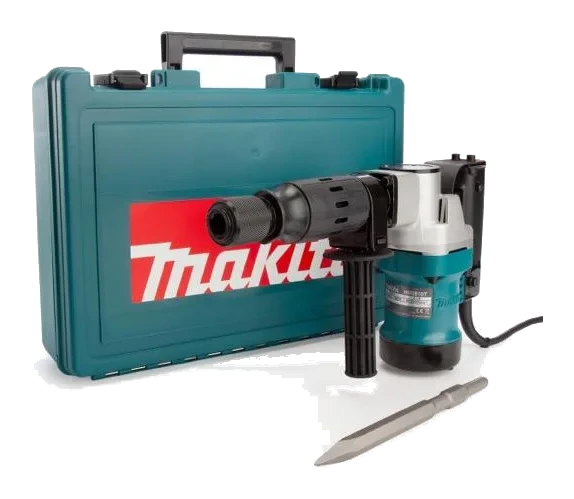
Rotary Jackhammer

Also called Rotary hammer · SDS drill · Hammer drill · Rotary hammer drill

Hammering plus rotary drilling in one tool — drills big holes in concrete and chips light demolition.

Electric (corded)

Overview

A rotary hammer turns and hammers at the same time, so it drills into concrete rather than merely spinning against it the way an ordinary drill does. Switch the hammering on by itself and it chips instead.

Drilling anchor holes in concrete, holes for rebar dowels and piping, chipping tile and light demolition, and masonry and block work.

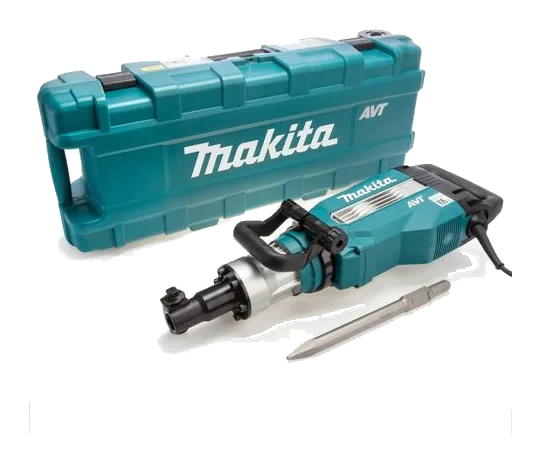
That second ability is what separates it from a breaker. A breaker only hammers, so it cannot make a hole.

Choose the mode before starting — rotary drilling, hammer drilling, or chisel only — and pull the bit out regularly to clear dust. A hole packed with dust stops cutting and cooks the bit.

Catalogue specifications

  • THESE HAMMERS USE THE ROUND HEX BITS AND SPLINE BITS
  • MODEL #HR4041C

Best uses

  • Drilling anchor holes in concrete
  • Holes for rebar dowels and piping
  • Chipping tile and light demolition
  • Masonry and block work

Troubleshooting

Bit won't lock into the chuck

Checks to try, in order

  1. Pull back the chuck collar, push the bit in and rotate it until it drops into the slots.
  2. Wipe and lightly grease the bit shank.

Reference draft — always follow the manufacturer’s manual.

Link to this fixDid this solve the problem?
Drills but doesn't hammer

Checks to try, in order

  1. Check the mode selector.
  2. Apply firm pressure — the hammer only engages under load.

Reference draft — always follow the manufacturer’s manual.

Link to this fixDid this solve the problem?
Tool jerks and stops rotating

Checks to try, in order

  1. That's the safety clutch slipping because the bit bound up. Release the trigger, free the bit and start again.

Reference draft — always follow the manufacturer’s manual.

Link to this fixDid this solve the problem?
Tool won't switch onShared · Electric (corded)

Likely causes

  • Tripped GFCI or breaker
  • Lock-off button
  • Damaged cord
  • Dead outlet

Checks to try, in order

  1. Check the outlet works and reset any GFCI / RCD that has tripped.
  2. Release the lock-off button or safety switch before squeezing the trigger.
  3. Inspect the cord and extension lead for cuts, crushed sections or damaged plugs.
  4. If running from a generator, make sure it's running and its breaker hasn't tripped.

A damaged cord or plug means the tool is out of service. Tag it and return it — never tape a cord.

Reference draft — always follow the manufacturer’s manual.

Link to this fixDid this solve the problem?
Keeps tripping the breakerShared · Electric (corded)

Likely causes

  • Circuit overloaded
  • Undersized extension cord
  • Blunt accessory

Checks to try, in order

  1. Plug into a circuit with nothing else heavy running on it.
  2. Use a shorter, heavier extension cord. Long, thin cords starve the motor and trip breakers.
  3. Don't force the tool — a dull bit, blade or disc makes the motor draw more current.

Reference draft — always follow the manufacturer’s manual.

Link to this fixDid this solve the problem?
Overheating, burning smell or heavy sparkingShared · Electric (corded)

Checks to try, in order

  1. Stop and unplug the tool.
  2. Check the motor vents aren't blocked with dust.
  3. Let it cool, fit a sharp accessory and let the tool's weight do the work.

Heavy sparking from the vents or a burning smell that returns points to worn brushes or a failing motor — workshop only.

Reference draft — always follow the manufacturer’s manual.

Link to this fixDid this solve the problem?

Safety

  • Hold it with both hands, using the side handle — a binding bit can twist the tool hard.

For electric (corded)

  • Inspect the cord and plug before every use. Use a GFCI/RCD outdoors or near water.
  • Unplug before changing blades, bits, discs or pads.
  • Wear eye protection, and a dust mask when cutting, grinding or sanding masonry.

Videos & links

Related equipment

All Power Tools →

Always follow the manufacturer’s manual and site safety rules. Favourites and viewing history are stored on this device.