13 · Floor Care
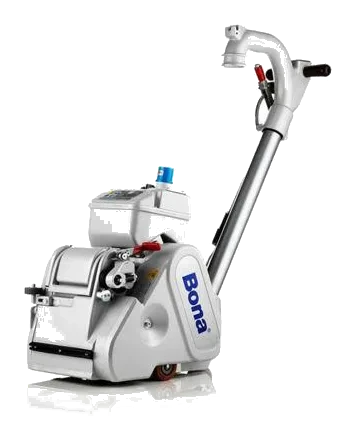
Floor Sander
An abrasive belt or pad machine that strips old finish and smooths wooden floors ready for refinishing.
15 · Power Tools
Also called Random orbital sander · RO sander · Palm sander
A sander whose circular pad moves in an orbit for an even, swirl-free finish on wood, metal and plastic.
Electric (corded)A random orbital sander spins its pad and moves it in a small orbit at the same time, so no grain of abrasive travels the same path twice. That is what gives a swirl-free finish where a plain rotary sander leaves circular marks.
We rent a 5 in. Furniture refinishing, prepping doors, cabinets and trim for paint, smoothing between coats, and light rust and paint removal.
Work up through the grits — 80, then 120, then 180 — because each one removes the scratches the last one left.
Keep the pad flat and let the tool's own weight supply the pressure. Pushing down slows the orbit and puts the swirl marks straight back.
Typical figures for this class of machine. Check the data plate before promising a customer.
Reference draft — always follow the manufacturer’s manual.
Reference draft — always follow the manufacturer’s manual.
A damaged cord or plug means the tool is out of service. Tag it and return it — never tape a cord.
Reference draft — always follow the manufacturer’s manual.
Reference draft — always follow the manufacturer’s manual.
Heavy sparking from the vents or a burning smell that returns points to worn brushes or a failing motor — workshop only.
Reference draft — always follow the manufacturer’s manual.
No fixes match this symptom.
13 · Floor Care
An abrasive belt or pad machine that strips old finish and smooths wooden floors ready for refinishing.
15 · Power Tools
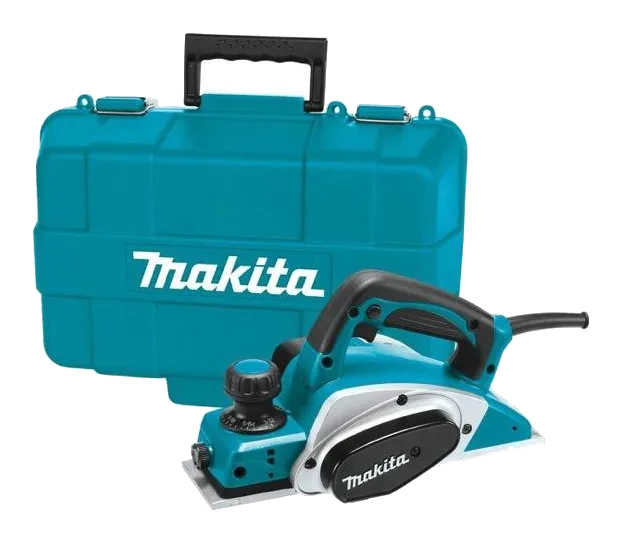
A handheld planer that shaves thin layers off wood to flatten boards, trim doors and chamfer edges.
15 · Power Tools
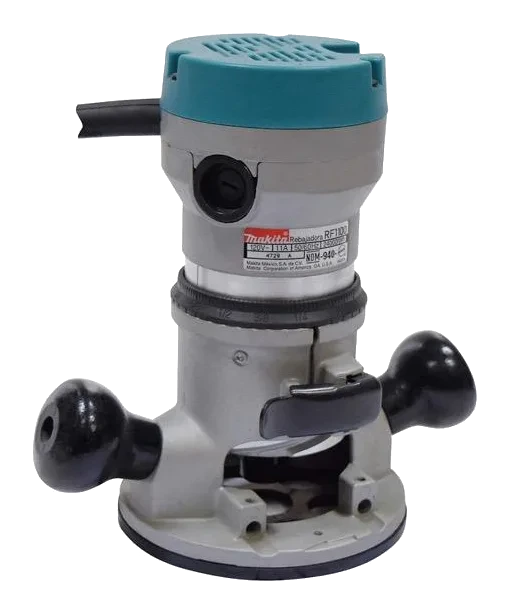
A high-speed cutting tool for shaping edges, grooves, dados and moulding profiles in wood.
Always follow the manufacturer’s manual and site safety rules. Favourites and viewing history are stored on this device.